
Product feeds for Facebook and Instagram catalogs
One address Meta Commerce Manager reads your products, prices and stock from, so catalog ads match your shop.
A product feed is one web address that lists your products with their prices, photos and stock. Meta Commerce Manager reads it once a day and keeps your Facebook and Instagram catalog the same as your shop, so you do not type your products in again.
Turn it on
- Open Settings → Shop details and turn on Product feeds. It is off until you turn it on. Turning it on opens the two addresses; later, press Edit on the row to see them again.
- Copy the first address, Feed for Meta. It is your shop's retriever.com.np address ending in /feeds/products.xml.
- In Meta Commerce Manager, open your catalog, then Data sources → Add items → Data feed → Scheduled feed. Paste the address, choose how often Meta reads it (daily is enough), then press Upload.
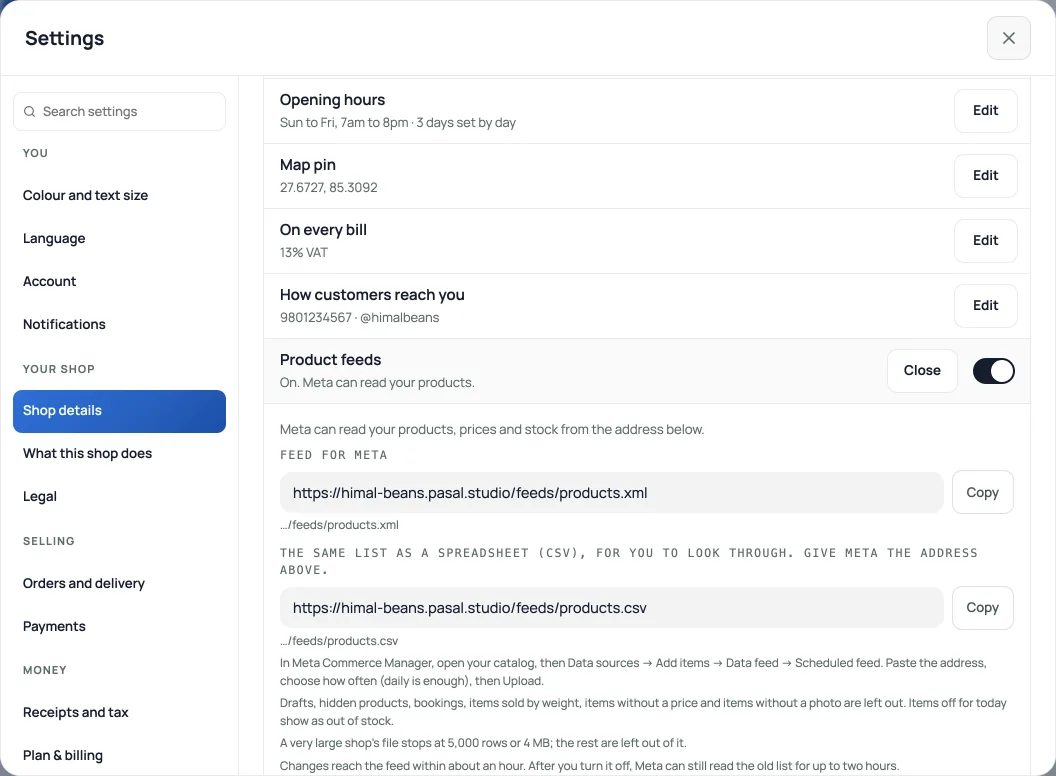
The second address, ending in /feeds/products.csv, is the same list as a spreadsheet for you to look through. Give Meta the first one. If your shop has its own domain, the same paths work there too once the domain is connected and opening your shop.
What the feed lists
Every published product with a price and a photo, with your sale price when it is lower. A product with sizes or colours is listed once per option, grouped together. Items off for today, sold out or counted down to zero are listed as out of stock rather than removed, so your ads do not stop and start.
Left out: drafts, products you have hidden from your shop, bookings, items sold by weight, and items with no price or no photo.
A barcode is sent only when it is a real product barcode (8, 12, 13 or 14 digits with a correct check digit). The brand is the one on the product, or your shop's name.
Prices are the ones on your shelf. If your shop is VAT registered, that is the price before VAT, the same as your shop page shows.
A very large shop's file stops at 5,000 rows or 4 MB, and the products past that are left out of it.
Changes reach the feed within about an hour. After you turn it off, Meta can still read the old list for up to two hours. While your shop shows Price on request, the feed is paused.
Google Merchant Center can read the same address, but Google cannot show these products to shoppers in Nepal: Nepal is not one of the countries Merchant Center serves, and rupees (NPR) are not one of its currencies. It only helps a shop that sells abroad.
What Meta decides
Facebook and Instagram shops are not available in Nepal: Meta says so when you choose Nepal in Commerce Manager. So there is no shop tab on your profile and no tagging products in posts. The feed is for catalog ads, which show your products with their photo and price and send shoppers to your own product page, and for your WhatsApp Business catalog. Checked on 20 October 2026; Retriever will update this if Meta opens shops in Nepal.
- Add your own 360° photos or a 3D product modelLet shoppers rotate a set of product photos or explore a GLB model, alongside the usual gallery.
- Make the shop look like yoursTemplate, colours, logo, hero photo, and the order of the page, all from the Design tab.
- Preview a look before you save itTry a card in Browse designs, check the Not saved bar, then save the look or discard the trial.