
Tax invoice numbers
Fill in your PAN and every paid order gets a numbered tax invoice, counting up from 1 each Shrawan.
An order number like PSL-D4QWN8 tells you which sale it is. It does not tell anyone how many sales came before it. A tax office wants the other thing: a run of numbers that starts at 1 and counts up with nothing missing, so a sale left out of the books shows up as a gap.
- Open Settings, then Shop details. Press Edit beside Name, address and PAN, fill in your PAN/VAT number and press Save changes.
- Carry on as normal. From then on, every order you mark paid is given the next number in your series and its document reads Tax invoice, or Invoice if you are not VAT registered.
What a number looks like
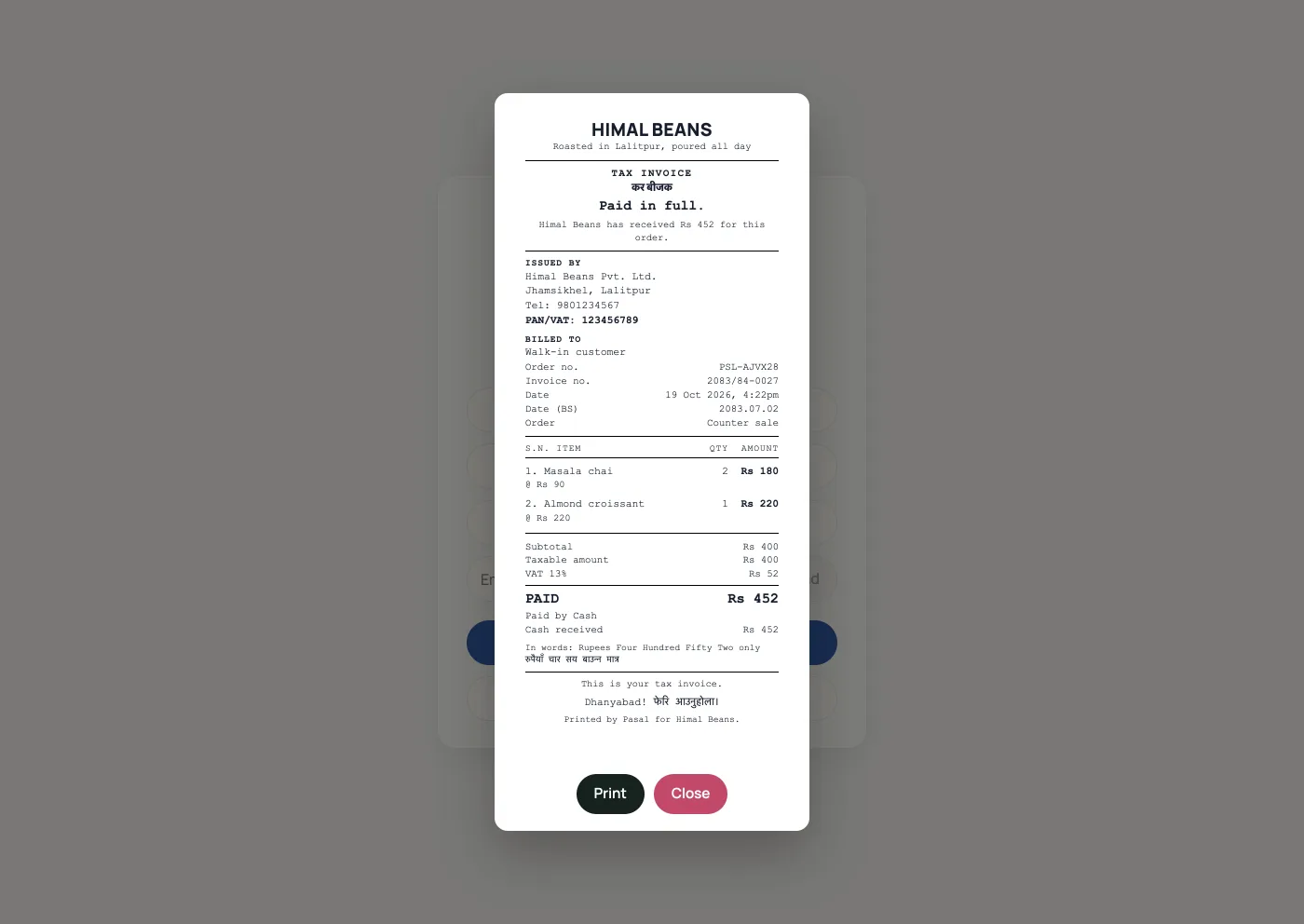
2083/84-0001. The first part is the Nepali fiscal year, which runs from Shrawan to Ashad. The second is where this sale sits in that year. Every Shrawan the count starts again at 0001 in the new year, exactly as your books do. The number is yours alone: another shop on Retriever has its own 0001.
You can find a sale by it. Type the number into the search box on the Orders tab and the order comes up, which is the question an accountant actually asks: not "which order was this", but "which sale is 2083/84-0042".
No PAN means no number, and that is correct
A shop with no PAN on file cannot issue a tax invoice, so its paid orders get a Payment receipt instead, with no number on it. That is a real document and it is not a fault. It says plainly that it is not a tax invoice, because a blank PAN might mean you are not registered or might mean nobody has typed it in yet, and a piece of paper cannot tell those apart.
PAN on the bill is not the number
The PAN/VAT line at the top is your shop's registration. Every bill prints it once you have filled it in. A tax invoice also needs the next number in your series, the line that reads Invoice no. Until that number is on the sale, the paper is a payment receipt, even though the PAN is there.
Type your PAN in next Baisakh and your series still starts at 0001, with your first newly numbered document. It does not start at 84 with 83 documents behind it that were never given to anybody.
The number is written once
- Ordinary sales are numbered on payment. A PAN-backed counter sale supplied on Khata can be numbered when it is attached to the credit bill, before full payment. An ordinary unpaid order that has not been supplied on Khata does not take a number just by being placed.
- It never changes. Reprint the bill in five years and it reads exactly as the customer's copy does. Send the receipt again and it carries the same number, because two numbers for one sale is the thing numbering exists to make visible.
- The goods and the figures stop changing too. Once the number is on the bill, Retriever will not let anyone rewrite the lines, the discount, the VAT or the total. Cancel the order or refund it: both keep the document, and both are recorded.
- An invoiced order cannot be deleted. Retriever refuses, and says so. Cancel it or refund it instead: both keep the row, and a hole in the middle of the series is exactly what the numbering is for. See Cancelling an order.
- Cancellation keeps a number already issued. A cancelled order that was never numbered, or a zero-total order, does not take a new number.
A sale rung on the counter while the internet was down prints as a payment receipt, because the number is given by Retriever and that counter is not talking to Retriever yet. The moment it syncs, the sale gets its number and the customer's emailed copy carries it. Press View receipt again after it has synced if you need the numbered paper in your hand.
- Tax invoices and sales recordsPAN/VAT invoices and a record of every sale for your accounts.
- Check the month's takingsThe Sales tab month by month: what counts as paid, what is still owed, and the spreadsheet for your accountant.
- The pack to hand your accountantSales, spending and wages for a period, on four panes, each with a download. It reads and exports, and writes nothing.