
Tax invoices and sales records
PAN/VAT invoices and a record of every sale for your accounts.
Retriever's IRD software approval is pending. A numbered sales record or receipt does not establish IRD approval or permission to use electronic billing for your business. Live submission is disabled; seethe Off/Test guide and confirm your obligations with IRD or your adviser.
Retriever keeps a clean record of your sales so tax time is not a scramble.
- Add your PAN/VAT: open Settings, then Shop details, and fill in your legal name and PAN. Every bill and every emailed receipt then carries them.
- Numbered automatically: once your PAN is on file, each order you mark paid is given a tax invoice number of its own, like 2083/84-0042. See Tax invoice numbers.
- Open any bill: on Sales, the invoice button at the end of a row opens the itemised document, ready to print or email. On Orders it is the first item in the row's three-dot menu.
- Hand it to your accountant: the Sales tab lists past orders and totals month by month, and exports the lot as a spreadsheet. See Check the month's takings.
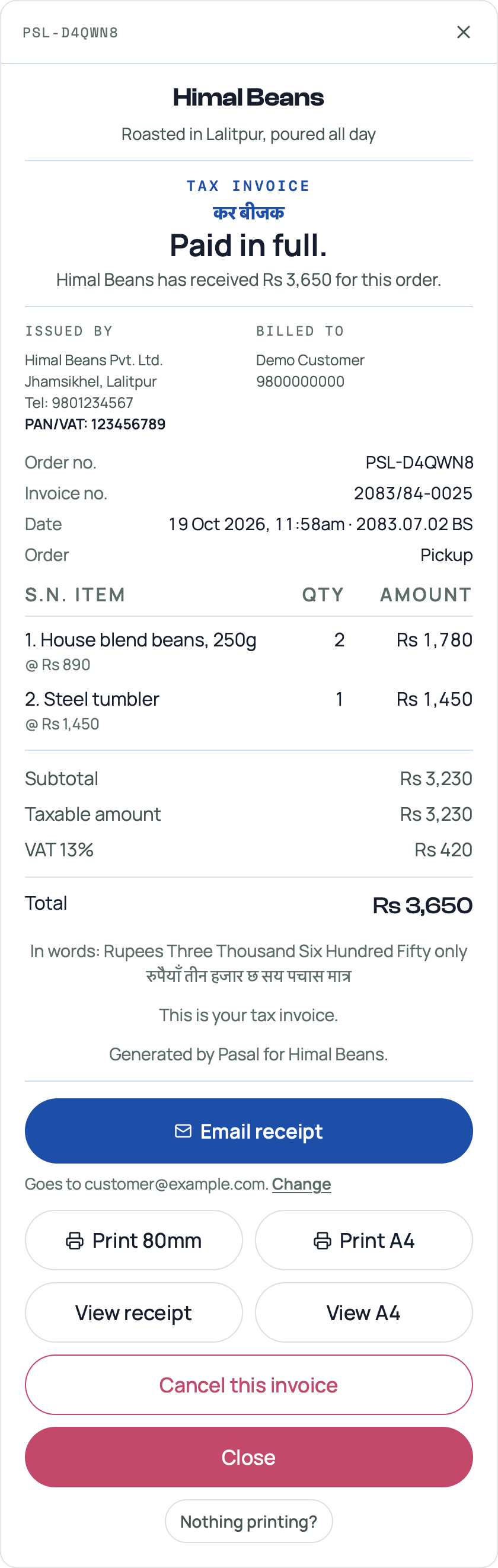
The heading is not a style. Paid, with a PAN and a number, it is a Tax invoice if you are VAT registered and an Invoice if you are not. Paid with a PAN but no number yet, or paid with no PAN at all, it is a Payment receipt and the paper says so. Nothing paid yet, and it is an Order summary. The PAN line at the top is who you are. It does not by itself make the paper a tax invoice. See Tax invoice numbers.
The customer gets the same document by email as a PDF they can keep, see The PDF receipt your customer keeps.
- The PDF receipt your customer keepsEvery order now emails a proper receipt the customer can print, file, or hand to their accountant.
- Tax invoice numbersFill in your PAN and every paid order gets a numbered tax invoice, counting up from 1 each Shrawan.
- Check the month's takingsThe Sales tab month by month: what counts as paid, what is still owed, and the spreadsheet for your accountant.